Description
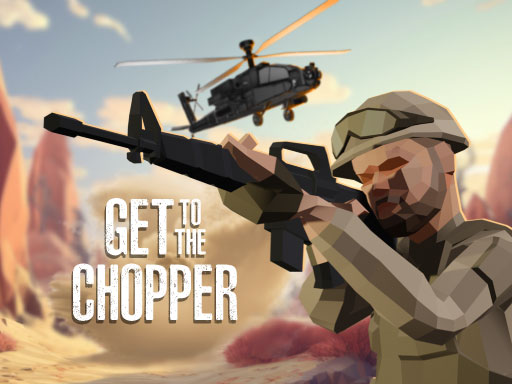
Gear up, soldier! Every mission is a desperate battle for survival. In Get To The Chopper, you're dropped into a warzone with one objective: eliminate all enemies and fight your way to the extraction chopper.
This is a fast paced, 3D first person shooter that will test your skills. You'll blast through enemy waves across dynamic battlefields, from dense forests to sun baked deserts. You'll need the same sharp skills as in Hazmob FPS to dominate.
Don't go in empty handed. You control a fully customizable loadout. Choose your primary gun, secondary weapon, grenades, and even a melee weapon to fit your combat style. This is one of the most intense ways to play action games online.
The chopper is waiting. Can you survive the fight and get out alive? Prove it now!
Gameplay Highlights
- ???? Playable on all devices, but best on PC for precision aiming.
- ???? Experience intense 3D first person shooter (FPS) action.
- ???? Fight through waves of enemies to reach the extraction chopper.
- ????️ Battle across dynamic maps like forests and deserts.
- ???? Customize your full loadout: primary, secondary, grenades, and melee.
- ????️ Master classic FPS controls for moving, aiming, and shooting.
FAQ
Q: What devices can I play Get To The Chopper on?
A: Get To The Chopper is an instant play browser game that works on all devices, but it's best on PC for keyboard and mouse controls.
Q: How do I move and shoot?
A: On a PC, you use the WASD keys to move, the Mouse to aim, and click the Left Mouse Button to shoot.
Q: What is the main goal of the game?
A: Your main objective is to eliminate all enemies in the level and fight your way to the helicopter extraction point to survive.
Q: Can I change my weapons?
A: Yes! The game features a fully customizable loadout where you can select your primary gun, secondary weapon, grenades, and melee weapon.
Instructions
How to Play Get To The Chopper
This is a fast paced first person shooter. Your goal is to fight your way through enemy territory, eliminate all threats, and reach the extraction helicopter.
PC Controls
- Move Forward: Press W
- Move Left: Press A
- Move Backward: Press S
- Move Right: Press D
- Jump: Press Spacebar
- Run: Hold Shift
- Crouch: Press C
- Aim Down Sights: Click the Right Mouse Button or press L
- Shoot: Click the Left Mouse Button or press K
- Pick Up Gun: Press G
- Switch Weapons: Press 1, 2, 3
- Use Skills: Press 4, 5, 6
- Alternative Skills: Press E or Q
- Pause / Settings: Press P
Mobile & Tablet Controls
(Note: PC is recommended)
- Move: Use the on screen virtual joystick.
- Aim: Swipe the right side of the screen.
- Shoot/Aim: Use the on screen buttons.
Tips and Tricks
- Use your primary weapon for most fights, but switch to your secondary (pistol) if you run out of ammo.
- Don't forget to use your grenades (4, 5, 6) for groups of enemies.
- Always use cover and aim down your sights (Right Mouse Button) for better accuracy.
- Keep moving! Standing still makes you an easy target.







Comments