Description
Screw Masters 3D Puzzle: Tactical Dismantling
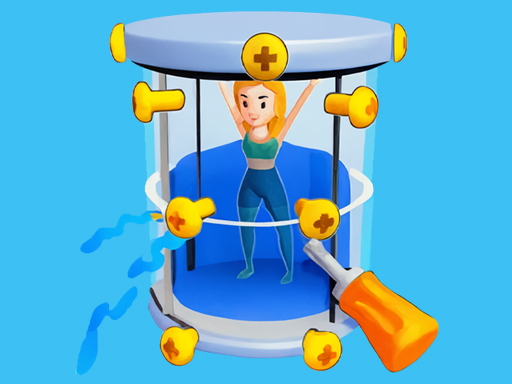
Screw Masters 3D Puzzle is a logic game that treats dismantling objects like a strategic color-sorting test. Your goal is to unscrew bolts from 3D models (like snow globes or toys) and place them into corresponding toolboxes. However, you cannot simply click every screw you see. Each toolbox has only 3 slots. You must clear screws in specific groups of three to free up space for the next batch. If you fill your active slots with mismatched screws, you fail the level.
Resource Management and Boosters
Success requires planning your moves to ensure you always have an open slot for the screws blocking your path. If you get stuck, the game offers a tactical economy using Tickets. You can spend these on powerful boosters like "Add Hole" (to get an extra temporary slot), "Refresh" (to shuffle box colors), or "Clean" (to remove a difficult screw). It offers a more physics based challenge than the textile sorting in Thread Match, requiring you to rotate the object and find the structural weak points.
Key Features
- ???? Claim rewards daily with a 7-Day login bonus system.
- ????️ Utilize 3 distinct boosters: Add Hole, Refresh, and Clean.
- ???? Fill and clear color-coded boxes to progress through the level map.
- ???? Earn Tickets to purchase Revives and Booster packs.
- ???? Dismantle complex 3D structures screw by screw.
Common Questions
Q: Is Screw Masters 3D Puzzle mobile friendly?
A: Yes, the game is designed for vertical mobile play with simple tap controls.
Q: What are the Tickets used for?
A: Tickets are the in-game currency used to buy boosters or revive yourself if you run out of moves.
Q: Is the game free to play?
A: Yes, it is a free browser game, though you can watch ads to double your rewards.
Instructions
How to Play Screw Masters 3D Puzzle
Your objective is to remove all screws from the object by placing them into boxes of the matching color.
PC Controls
- Unscrew: Click the Left Mouse Button on a screw to move it to a box.
- Rotate Object: Click and drag the Left Mouse Button on the empty background to spin the object.
- Use Booster: Click the booster icons on the right side of the screen.
Mobile & Tablet Controls
- Unscrew: Tap a screw to place it in the active box.
- Rotate Object: Swipe on the background to view the object from different angles.
Tips and Tricks
- Watch the Box Color: You can only place a screw if its color matches the current active box. Don't click a Blue screw if you have a Green box waiting.
- Save the "Add Hole": The "Add Hole" booster is your most valuable lifeline. Save it for levels where you are completely blocked by mismatched colors.
- Prioritize Layers: Remove top-layer screws first. If a screw is covering another one you need, you must clear the top one before you can access the bottom one.









Comments